

JOPS Meets Next.js: Class-Based SPAs Inside Server-Rendered Apps
JOPS 1.1.0 runs a full single-page app inside a Next.js page, next to React, with Route Handlers as its backend and one component to connect them
פורסם ב: October 26, 2026
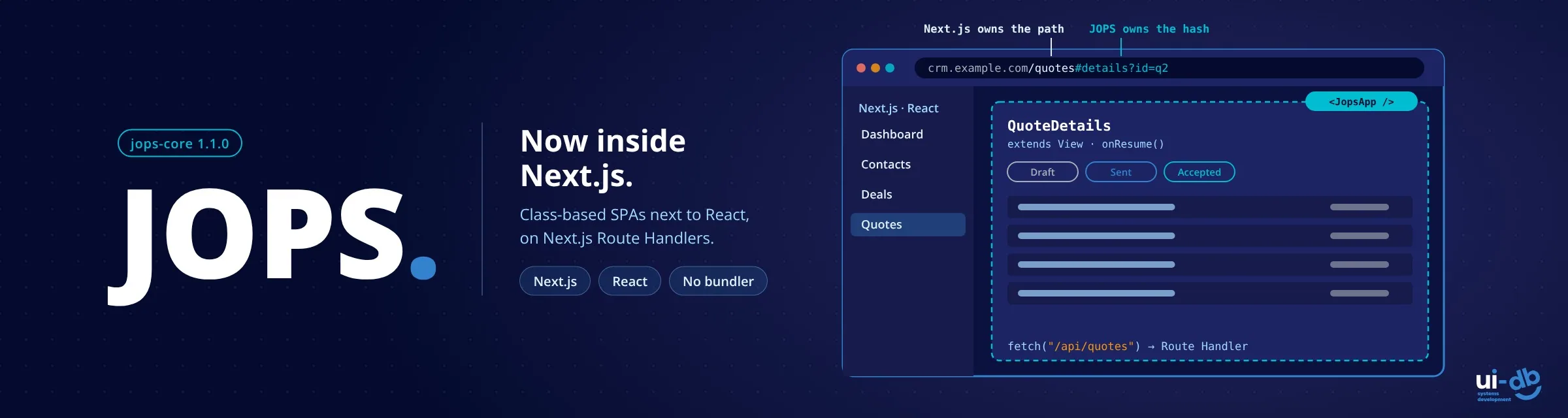
When we shipped hybrid mobile support in JOPS 1.0.13, we said the next step was to examine how JOPS and Next.js could work together. With jops-core 1.1.0, that work is done: a complete JOPS single-page app can now run inside a page of a Next.js app, next to React, with Next.js Route Handlers as its backend.
This isn't JOPS competing with React. Next.js keeps everything it does best: server rendering, data fetching, routing and the React ecosystem. JOPS adds class-based views with an Android-style lifecycle on the pages that need them. One codebase, two models, each where it fits.
Why bring classes into a Next.js app
Object-oriented design is how most backend and mobile developers think: Java, C#, Kotlin, Swift, Android and UIKit are all built around classes. Modern React has moved the other way. Server Components are async functions, and React's newest features are built for function components. Classes still work in client components, but a class-based architecture no longer fits naturally in a modern React and Next.js codebase.
Functions and hooks are a proven model, and many teams are productive with them. JOPS gives teams that think in classes a first-class place inside the same app, without asking anyone to switch.
How it works
The split is simple:
- Next.js owns the path, JOPS owns the hash. The page
/quotesis a Next.js route;/quotes#details?id=q2is a screen inside the JOPS app. - The JOPS app lives in
public/and is served as-is. Turbopack and webpack never bundle it, so JOPS keeps its no-build design. - The backend is Next.js. The JOPS app calls Route Handlers with
fetch(), on the same origin, with the session cookie sent automatically.
The bridge is a single React component, JopsApp, imported from jops-core/nextjs:
// src/app/quotes/page.tsx
import JopsApp from "jops-core/nextjs";

export default function QuotesPage() {
  return <JopsApp app="/quotes/App.js" id="quotes-root" />;
}
JopsApp is a Client Component, so a Server Component page can render it. On the server it renders an empty <div>. In the browser it loads the JOPS library once per page, adds the import map and starts the app inside that <div>. The app's entry module is the same App.js a standalone JOPS app uses:
// public/quotes/App.js
import { View } from "jops-core";

export default class App {
  constructor() {
    const root = new View();
    root.loadLayout("/quotes/layout/main.html").then(() => root.render());
  }
}
Proven on a real application
We didn't design the bridge on a whiteboard. We built a typical Next.js CRM first, on Next.js 16, React 19, the App Router and Tailwind CSS 4, and then rebuilt its entire Quote Builder as a JOPS app inside it:
- A quote list with status filters and loading skeletons
- Quote details with status actions and a printable quote document
- A two-step quote editor with a product picker, live totals and server-side validation
- A new-quote flow started from the CRM's own sales pipeline
All of it runs on the CRM's REST Route Handlers, styled with the same Tailwind classes as the rest of the app. Building a real feature end to end exposed issues no demo would have. We fixed them in the framework before the release, and the few that are better handled by convention are listed below.
An app lifecycle that respects the host
A JOPS app inside Next.js behaves like an app on a phone:
- Leaving the page ends the app completely. Follow a Next.js link elsewhere, or press Back past the app's first screen, and the router, every view, the app's
StoreandEventBus, and JOPS's history hooks are all removed. Nothing keeps running in the background. - Coming back launches it again and restores the screen from the hash.
- Next.js navigation keeps working. Next.js history state is preserved in every entry JOPS writes, so Back and Forward behave across both frameworks.
Get started
The quickest start is the new project template. In an empty folder:
npx jops-core init
# choose: 3. Next.js JOPS Embedded SPA
npm run dev
It creates a Next.js project with a React-only page, a page hosting a JOPS SPA (a mock login and a quotes list), and a Route Handler as its backend. To add JOPS to an existing Next.js app instead:
npm i jops-core
npx jops-core update   # copies the library to public/lib/
Then put your JOPS app in public/ and render <JopsApp app="/my-app/App.js" /> on the page that hosts it.
Not using React? The same mechanism works on any page: load the library with data-host, and start or stop the app yourself with window.JOPS.mount() and unmount().
Also new in 1.1.0
Building a full application inside Next.js shaped several additions that every JOPS app can use, standalone or hosted:
onPause(), the counterpart ofonResume(), called when another view comes to the front while this one stays alive.- Tag props: attributes on a declared view, such as
<Card jops title="Hi" item-id="7">, arrive as read-onlythis.props. - Layouts with several top-level elements, and
find(id)for every element with a given id. - Owned event subscriptions:
EventBus.subscribe(owner, event, callback)removes itself when its view is destroyed. - A round of router and view fixes found while building the Quote Builder, from reliable default routes to views that resume exactly once.
Know before you start
A few conventions keep the two frameworks out of each other's way:
- One JOPS app per page. The router,
StoreandEventBusare page-wide. - Root-absolute paths for everything JOPS loads, and the library served from
public/lib/rather than a CDN. - Next.js owns the CSS. Inside Next.js,
setStyle()is ignored; Tailwind picks up classes used in your JOPS files. - REST, not Server Actions. A JOPS app talks to Next.js through Route Handlers.
- Deploy
public/with the app, and use short cache headers for the JOPS files there, since they aren't content-hashed.
Try it
- jops-core on npm: the full guide is in the README section "Next.js Integration"
- GitHub for issues and discussions
- Introducing JOPS, if you're new to the framework
- JOPS Goes Mobile, the hybrid iOS and Android release
What's next: JOPS and Electron for standalone applications
JOPS now runs in the browser, in hybrid mobile apps and inside Next.js. The next environment on our list is the desktop. The JOPS team will examine integration with Electron, so the same class-based views can power standalone applications on Windows, macOS and Linux, with access to the file system and native menus through Electron's main process. Many of the internal tools JOPS was built for live on the desktop, and we'll share what we learn as the work progresses.
JOPS is built and maintained at UIDB, a boutique team of senior engineers who build custom systems with our clients, side by side. If you're extending a Next.js system or planning one that needs to hold up for years, we'd be glad to talk.
 תגיות:
- JOPS
- jops-core
- Next.js
- Next.js integration
- SSR
- server-side rendering
- React
- App Router
- Route Handlers
- single page application
- SPA framework
- JavaScript framework
- OOP
- class-based views
- object-oriented JavaScript
- Tailwind CSS
- Electron
- UIDB


השאירו תגובה