

JOPS Comes to WordPress: Class-Based SPAs Inside Your Pages
jops-core 1.1.2 adds a WordPress plugin and a [jops] shortcode, so a JOPS app runs inside any page built with Elementor or the block editor.
פורסם ב: October 28, 2026
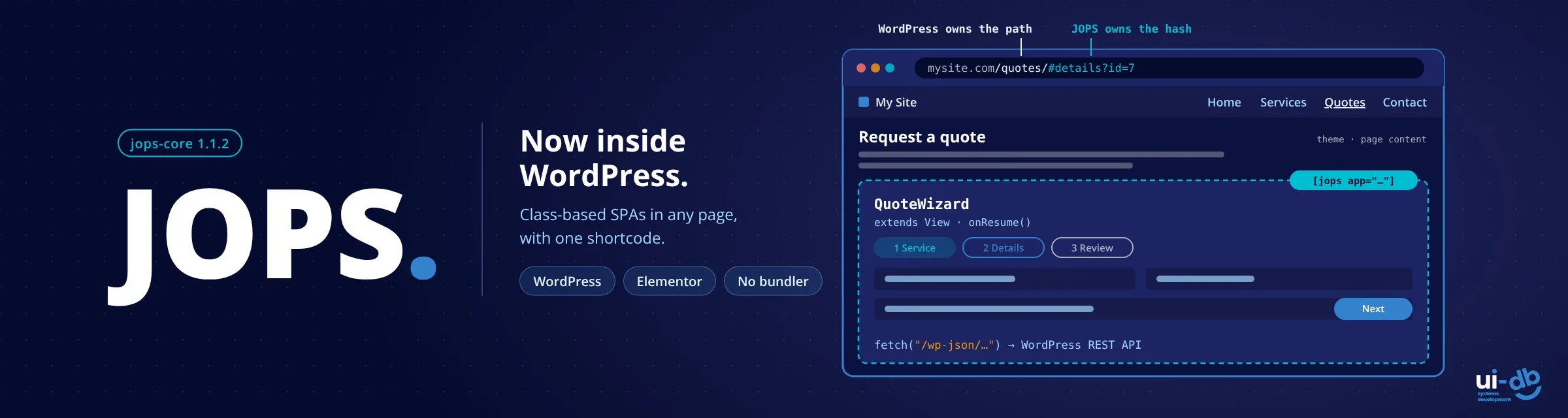
We made a small detour before finishing our Electron integration and made a short stop for WordPress integration 😊‚ A JOPS SPA can now run inside a WordPress page, next to the theme and the page's other content.
With jops-core 1.1.2, a new JOPS WordPress plugin adds a [jops] shortcode. Drop it into a page built with Elementor or the block editor, and a complete class-based single-page app renders there, below the theme's header and next to the rest of the page. WordPress stays the CMS and the backend. JOPS adds the parts of the page that behave like an application.
Why put an app inside a WordPress page
WordPress runs a large share of the web, and many of those sites eventually need more than content: a quote calculator, a customer portal, a booking flow, an internal dashboard behind the login. The usual options are a heavy plugin that almost fits, or a separate app on its own subdomain that loses the site's theme and menu.
JOPS offers a third option. The app lives in a folder of the site, keeps the site's look, talks to WordPress over its REST API, and needs no build step. Views are classes with an Android-style lifecycle, so the same structure that works in the browser, in hybrid mobile apps and inside Next.js now works inside WordPress too.
Two ways to run JOPS on WordPress
| Embedded in a page | Independent SPA | |
|---|---|---|
| What it is | The app renders inside a WordPress page, next to the page's content | A complete JOPS app with its own index.html, opened at https://<site>/<folder>/ |
| How | The JOPS plugin and the [jops] shortcode, or an Elementor HTML widget | Upload the app folder; no plugin |
| Shares the theme, menu and page | Yes | No |
Both work because of how WordPress handles requests: it only processes URLs that are not existing files or folders. A JOPS app in a folder of the WordPress root is served as static files, and WordPress never gets in the way.
Install the plugin, three ways
Most WordPress sites don't use npm, so the plugin doesn't require it. Every GitHub release now carries a ready-to-upload jops-wordpress.zip with the jops-core library included:
- No npm (hosting with wp-admin only, XAMPP, MAMP, LocalWP): download jops-wordpress.zip, then Plugins → Add New Plugin → Upload Plugin → Install Now → Activate.
- An npm project run by
wp-env:npx jops-core init --wpwrites the plugin toplugins/jops/and adds it to.wp-env.json.npx wp-env startinstalls and activates it. - An npm project inside a WordPress folder (a theme, a plugin, a Bedrock project):
npx jops-core init --wpsearches upward for WordPress and writes the plugin to its plugins folder.--wp-root <path>points to WordPress directly.
All three install the same plugin into wp-content/plugins/jops/. To update without npm, upload the newer zip and choose Replace current with uploaded; with npm, npx jops-core update refreshes the plugin and its library.
Add the app to a page
1. Put the app folder in the WordPress root, the folder with wp-config.php, for example <root>/jops-spa/. Upload it, copy it over SSH, or deploy it with your pipeline.
2. Use root-based paths for everything JOPS loads: the app module, layouts, stylesheets and images.
// /jops-spa/src/App.js
import { View } from "jops-core";

export default class App {
  constructor() {
    const root = new View();
    root.loadLayout("/jops-spa/src/layout/main.html").then(() => root.render());
  }
}
3. Add the shortcode. In Elementor, add a Shortcode widget (General → Shortcode); in the block editor, use the Shortcode block:
[jops app="/jops-spa/src/App.js" id="jops-spa-root" class="jops-spa"]That's it. On the published page, the shortcode outputs the import map, the library in hosted mode, the app's root <div> and a small script that mounts the app once the library has loaded. In the Elementor editor, the widget shows a clear placeholder instead, so the app never fights the editor for the page.
Prefer no plugin? An Elementor HTML widget can hold the same code by hand, with the library vendored in the app folder. The README has the snippet.
How the two systems share a page
- WordPress owns the path, JOPS owns the hash.
/quotes/is a WordPress page;/quotes/#details?id=7is a screen inside the JOPS app. - The backend is WordPress. The app calls the REST API with
fetch("/wp-json/…")on the same origin, so the login cookie is sent. Requests that act as the logged-in user also need a REST nonce, provided by your theme or plugin. - The theme owns the page's CSS. The app's stylesheet applies to the whole page, so scope every rule under the app's root class (
.jops-spa .card { … }) and leavebodyand:rootto the theme.
What we tested it on
We built and tested each install path on its own WordPress site before the release:
| Install path | Environment | Stack |
|---|---|---|
| Zip upload, no npm | Docker, wordpress:php8.3-apache | WordPress 7.1.3, Elementor 4.3.5, Hello Elementor |
init --wp in a wp-env project | @wordpress/env | WordPress 7.1.3, PHP 8.3, Elementor 4.4.0 beta |
init --wp from a theme folder | Docker, root folder mounted | WordPress 7.1.3, Elementor 4.3.5, Hello Elementor |
On each site the app rendered on the published page, every route switched, images loaded, and the page made exactly one library request with no console errors. We also checked the edge cases: a second [jops] on the same page, a wrong library URL, the block inserted later by JavaScript, and the Elementor editor's live re-render.
Testing on real WordPress also found a bug in jops-core itself: the jops:ready event could fire before the library had finished initialising. It's fixed in 1.1.2, which helps every hosted JOPS app, not only WordPress ones.
Know before you start
- One JOPS app per page. A second
[jops]on the same page logs a warning and doesn't start. - The app runs on the published page, not inside the Elementor editor.
- Pick a folder name that isn't a page slug and doesn't start with
wp-: a real folder always wins over a WordPress page at the same address. - WordPress in a subfolder (
example.com/blog/) means every path includes it:/blog/jops-spa/…. - Watch your caches. Caching plugins and CDNs may keep serving old copies of the app's static files after an update.
Also new in 1.1.2
View.removeSubViews(condition?)removes and destroys every subview, or only those that match a condition.jops:readynow fires after jops-core has fully initialised, so callingmount()from the listener is safe.
Try it
- Download the JOPS WordPress plugin (always the newest release)
- jops-core on npm: the full guide is in the README section "WordPress Integration"
- GitHub for issues and discussions
- Introducing JOPS, if you're new to the framework
- JOPS Meets Next.js, the same idea inside React apps
What's next: back to Electron
The detour is over, and the JOPS team is back on the road to the desktop. The Electron integration is in progress, so the same class-based views can power standalone applications on Windows, macOS and Linux. We'll share what we learn, including what doesn't fit.
JOPS is built and maintained at UIDB, a boutique team of senior engineers who build custom systems with our clients, side by side. If your WordPress site needs an application inside it, or a system that needs to hold up for years, we'd be glad to talk.
 תגיות:
- JOPS
- jops-core
- WordPress
- WordPress plugin
- Elementor
- shortcode
- single-page application
- SPA framework
- JavaScript framework
- no bundler
- ES modules
- class-based
- WordPress REST API


השאירו תגובה